The Freelance Rate Calculator Formula, Worked End to End
Follow the freelance rate calculator formula step by step with one real example: a UX designer turning an $85,000 take-home goal into an hourly rate.
Practical guidance, not financial advice. Sukie is a working freelancer, not a licensed accountant or financial advisor. Use this to make a defensible decision, then confirm the specifics for your situation with a qualified professional.

By Sukie · Founder & Writer, FreelanceRateLab
Updated August 11, 2026 · 8 min read
Most rate advice stays abstract, so this guide does the opposite. We're going to follow one freelancer through the entire freelance rate calculator formula, with every number shown, from a take-home goal all the way down to the hourly rate she should actually quote.
Meet Maya. She's a UX designer who left an agency job eighteen months ago. She wants to clear $85,000 in take-home pay this year, she plans to take four weeks off, and she's tired of guessing whether her current $90/hour is too low. By the end of this page she'll have a defensible number, and you'll have a template you can drop your own figures into. The same math powers the freelance rate calculator on the homepage, so you can check Maya's work against it as we go.
The Formula, and the One Mistake Almost Everyone Makes
Here's the whole thing in one line:
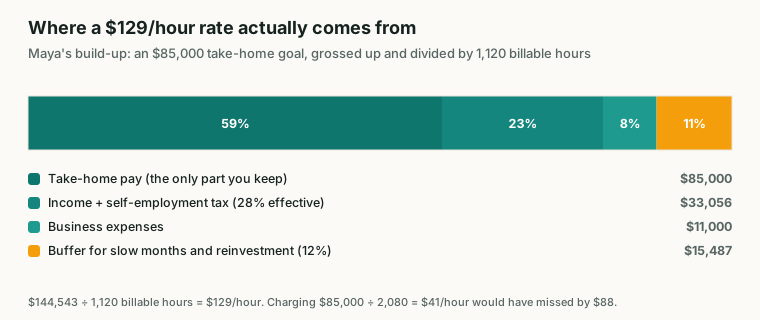
Maya's build-up. Take-home is 59% of the total — the rest is tax, expenses and buffer the rate has to carry.
(Take-home goal, grossed up for tax + annual expenses + buffer) ÷ realistic billable hours = your floor rate
That's it. Five inputs, one division. The reason people still get it wrong isn't the arithmetic, it's that they skip straight to dividing by the wrong denominator.
The mistake I see constantly, and one I made my first year, is dividing the income goal by 2,080 hours (40 hours a week times 52 weeks). That assumes you bill every single working hour. You don't. Nobody does. Sales calls, proposals, invoicing, revisions you ate, the Tuesday a client ghosted you for six hours of "any update?" Slack messages. None of that is billable. Maya quickly learned that lesson, and it's why her real denominator will be far smaller than 2,080. We'll build up each input in order.
| Input | What it means | Maya's figure |
|---|---|---|
| Take-home goal | Cash you want in your pocket after tax | $85,000 |
| Tax gross-up | Multiplier to cover income + self-employment tax | ÷ 0.72 (28% effective) |
| Annual expenses | Software, hardware, insurance, marketing | $11,000 |
| Buffer | Slow months, bad-debt, reinvestment | 12% |
| Billable hours | Hours you can actually sell in a year | 1,120 |
Keep that table handy. Every section below fills in one row and updates Maya's running total.
Step 1: Gross Up the Take-Home Goal for Tax
Maya wants $85,000 to keep. That is not the same as $85,000 in revenue, because she owes both income tax and self-employment tax, which covers Social Security and Medicare. As a W-2 employee her old company quietly paid half of that for her. Now she pays all of it: 15.3% in self-employment tax on top of her regular income tax.
After a conversation with her accountant, Maya estimates a combined effective tax load of about 28%. So she keeps 72 cents of every revenue dollar. To find the revenue that leaves her $85,000, she divides rather than multiplies:
$85,000 ÷ 0.72 = $118,056
That gap is brutal the first time you see it. She has to bill roughly $118,000 just to take home $85,000. Plenty of new freelancers price as if tax doesn't exist, then get flattened by a four-figure bill in April. If you want the underlying numbers, the self-employment tax page at IRS.gov lays out exactly what the 15.3% covers and when estimated payments are due. Don't skip this step, and don't guess the percentage. Our deeper freelance tax basics guide walks through how to estimate yours.
Running total: $118,056.
Step 2: Add Your Real Business Expenses
Now Maya adds the cost of actually running the business. None of this came out of her pocket at the agency, so it's easy to forget.
Her list for the year:
- Design software and prototyping tools: $1,800
- A new laptop and monitor, amortized: $2,500
- Health insurance premiums she now pays herself: $4,200
- Professional liability insurance: $700
- Portfolio site, hosting, and accounting software: $900
- Marketing, a conference ticket, and a course: $900
That totals $11,000. (If you've never tallied yours, our freelance expenses checklist is a good place to start so you don't undercount.)
These dollars get added on top of her grossed-up income, because the rate has to fund both her salary and her overhead:
$118,056 + $11,000 = $129,056
Running total: $129,056.
A quick note on health insurance, since it's the line people most often leave off. For an employee it's invisible, deducted before the paycheck even lands. As a freelancer it's a real, large, monthly cost, and it absolutely belongs in your rate. Maya's $4,200 is conservative for a single person; with a family it can easily triple.
One more thing about the laptop. Maya bought it outright, but she didn't put the whole purchase price in this year's expenses. She spreads, or amortizes, the cost across the years she expects to use it, which is why a $2,500 machine she'll keep for two years shows up as roughly $1,250 here, rounded up alongside the monitor. Lumping a one-time capital purchase entirely into a single year's rate would inflate that year's number and then leave the rate artificially low the year after. Smooth big equipment costs across their useful life, and your rate stays steady instead of lurching.
Step 3: Add a Buffer for the Months That Go Sideways
If Maya prices for exactly $129,056, she's assuming a perfect year: every billable hour booked, every invoice paid on time, zero gaps between projects, nothing reinvested in growth. That year does not exist.
The buffer absorbs the chaos. It covers the slow stretch in late summer, the client who paid 60 days late, the proposal that didn't close, and the money she wants to put back into the business. Maya uses 12%. She'd go higher if one client made up most of her income, but she has five active clients, so her risk is reasonably spread.
$129,056 × 1.12 = $144,543
Running total: $144,543.
This is the number that has to come through the door this year. The buffer feels like padding until the first time a $14,000 cushion is the only reason you didn't have to take a bad client out of desperation. It's not padding. It's the difference between negotiating from strength and negotiating from panic.
Step 4: Calculate Billable Hours You Can Honestly Sell
Here's the denominator, and the part that makes or breaks the whole formula. Maya does not get to use 2,080.
Start with her plan: she works about 40 hours a week but takes four weeks off, so she has 48 working weeks. That's 1,920 working hours. But only a fraction of those are billable. Across an average week she spends roughly:
- 6 hours on sales, proposals, and client calls that don't bill
- 4 hours on admin, invoicing, bookkeeping, and email
- 2 hours on learning, portfolio work, and marketing
That's 12 non-billable hours, leaving about 28 billable hours in a 40-hour week. Across 48 weeks:
28 billable hours × 40 working weeks = 1,120 billable hours
(She uses 40 effective weeks rather than 48 to account for the ramp-up after time off, the odd sick day, and weeks that simply don't fill. This is the realistic number, not the optimistic one.) So Maya's true annual inventory is 1,120 hours, just over half of that naive 2,080. If you want to pressure-test your own figure, the billable hours guide and the breakdown of realistic billable hours per day show how fast that number shrinks once you log it honestly for a few weeks.
Denominator: 1,120 hours.
Step 5: Divide, and Read the Signal
Now the payoff. Maya divides her required revenue by her real billable hours:
$144,543 ÷ 1,120 hours = $129/hour
Her floor rate is about $129 an hour, not the $90 she's been charging. She has been undercharging herself by roughly 30%, which over a full year is the difference between hitting her goal and missing it by tens of thousands of dollars. That's the whole reason to run the math instead of eyeballing it.
Now watch how sensitive the result is, because this is the most useful thing the formula teaches. Suppose Maya's pipeline is thinner than she hoped and she can only sell 900 billable hours this year:
$144,543 ÷ 900 hours = $161/hour
Same goals, same expenses, but the rate jumps from $129 to $161 because there are fewer hours to spread the load across. That swing isn't a rounding error, it's a strategy signal. When the required rate climbs higher than your market will bear, the formula is telling you to pull a different lever: raise your value so clients accept the number, get more efficient so you bill more hours, trim expenses, or lower the income goal. It is not telling you to quietly go back to $90 and hope. (When you're ready to push the number up, how to raise your rate covers the conversation itself.)
If $129 to $161 feels too wide to commit to, that's also useful information: it means your real constraint is capacity, and you should fix the denominator before you touch anything else.
What did Maya actually do? She didn't jump straight to $161, and she didn't stay at $90. She set her new floor at $130, rounded from her 1,120-hour calculation, and quoted it to her next two prospects without flinching. Both said yes. The third negotiated her down to $120, which still cleared her old rate by a third, so she took it. The point isn't that every client accepts the formula's number on the first try. The point is that Maya now knows her floor cold, so when she discounts she's doing it on purpose, from a position of knowledge, rather than because she was too nervous to name a real figure. That confidence is worth as much as the extra dollars.
It's also worth saying what the formula is not. It's a floor, not a ceiling. Nothing stops Maya from charging more when the work is specialized, the deadline is tight, or the client clearly has budget. The formula guarantees she never goes below the number that keeps her business solvent. Everything above that line is upside she earns through positioning and reputation, not arithmetic.
Questions people ask
- What is the basic freelance rate calculator formula?
Take your annual take-home goal, gross it up for self-employment tax, add your yearly business expenses, add a buffer for slow months and reinvestment, then divide that total by your realistic billable hours for the year. The result is your floor hourly rate.
- Why can't I just divide my old salary by 2,080 hours?
Because 2,080 assumes you bill every working hour, which no freelancer does. After selling, admin, and downtime, most full-timers bill 1,000 to 1,300 hours a year. You also have to cover your own tax and expenses that an employer used to absorb, so dividing a salary by 2,080 dramatically underprices you.
- How much should I add for self-employment tax?
Plan for an effective combined tax load of roughly 25 to 35 percent depending on your bracket and state. The self-employment portion alone is 15.3 percent on top of income tax. Set the exact number after talking to a tax pro, but never price as if tax is zero.
- What buffer percentage should I use?
Ten to twenty percent is common. Use the higher end if most of your income comes from one or two clients or your pipeline is volatile, and the lower end if you have stable retainers and a diversified client base.
- How often should I rerun the formula?
At least once a quarter, and any time your expenses, capacity, or income goal changes. Rates set once and forgotten are almost always too low a year later.
- What's the fastest way to sanity-check my number?
Plug your five inputs into the homepage calculator and compare its output to the rate you currently charge. If the calculator's floor is meaningfully higher than your quote, like Maya's $129 against her $90, you've found money you're leaving on the table.
- Does the formula change if I sell fixed-price projects instead of hourly?
The math is identical, you just use the hourly floor as an internal check. Estimate the hours a project will take, multiply by your floor rate, and make sure the fixed price clears it. Our guide on hourly vs project pricing shows how to convert between the two without losing margin.
- My required rate is higher than competitors charge. Now what?
Treat that as a signal, not a verdict. You can raise your billable-hour count, increase the perceived value of your work so the rate is justified, reduce expenses, or revise the income goal. The one thing not to do is ignore the number and underprice on purpose.
Put these numbers to work
Use the free freelance rate calculator to turn this into your own hourly rate in under a minute.
Open the calculatorKeep reading
More in Setting Your Rate, or browse all guides.
True hourly rate is what survives tax, unbillable time and overhead. The full trace from a $75 invoice line to the $21 that reaches your account.
ReadFreelance hourly rate from salary, converted honestly: gross up for self-employment tax, replace benefits, add expenses, and divide by real billable hours.
ReadLearn how to stop undercharging as a freelancer with a rate floor formula, 5 warning signs, and a 4-step plan to raise your rate this week.
ReadRealistic billable hours per day for most freelancers sit at 4 to 6, not 7 or 8. See why the daily target matters, the math, and how to raise it sanely.
ReadBillable hours for freelancers are never the same as hours worked. See the real week, the efficiency math, and what it does to your rate.
ReadROI of hiring a freelancer, calculated the way finance wants it: loaded cost comparison, four attribution models, and the traps that inflate the number.
Read