Freelance Business Expenses Checklist Your Rate Must Cover
A freelance business expenses checklist, organized by category, so your rate funds every real cost instead of quietly paying for them out of your take-home.
Practical guidance, not financial advice. Sukie is a working freelancer, not a licensed accountant or financial advisor. Use this to make a defensible decision, then confirm the specifics for your situation with a qualified professional.

By Sukie · Founder & Writer, FreelanceRateLab
Updated August 11, 2026 · 8 min read
Every expense you forget is a quiet pay cut you hand yourself. When a client pays your rate, that money has to stretch across your software, your taxes, your laptop that dies every three years, and the salary you actually want to live on. Miss a cost on this freelance business expenses checklist and it does not vanish. It just gets paid out of your take-home instead of out of your rate, which means you worked for less than you thought.
This guide is not a price list. It will not tell you what a project management app costs this month. It exists to answer one question: which costs does your rate have to fund? Once you know that total, you feed it into the freelance rate calculator and your number stops being a guess. For what these items typically cost in real dollars, see the companion typical freelance expenses list. This page is the "what to include" half. That one is the "what it costs" half.
How to use this checklist
Go category by category. For each line, ask two things: do I actually pay for this, and is it for the business or my personal life? Write down a real annual number next to anything you say yes to. A subscription you pay monthly counts twelve times. A laptop you replace every three years counts as one-third of its price per year.
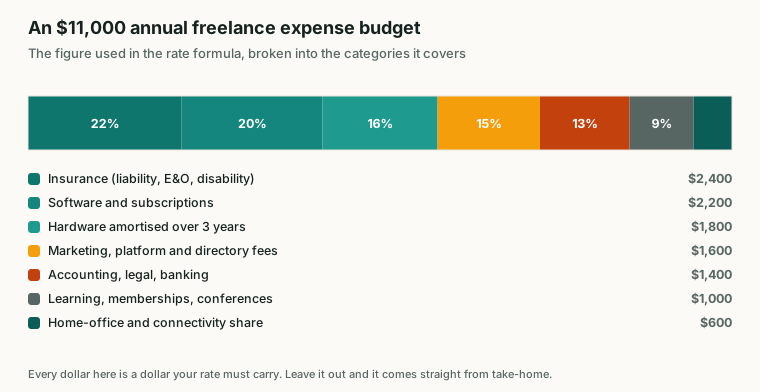
The $11,000 expense figure used in the rate formula, by category.
When you are done, you will have one figure: total annual business expenses. Keep that number handy, because the math at the end of this guide turns it into dollars-per-hour, and that is the part most freelancers skip.
Software and subscriptions
This is the category that bleeds people, because each line looks small and the total is brutal. I once added mine up for the first time after three years freelancing and found $2,300 a year I had never once accounted for in my rate. That was real money I had been donating to my own clients.
- Design, writing, or development tools you work in daily
- Cloud storage and file backup
- Project management and time tracking apps
- Email, calendar, and scheduling software
- Accounting or invoicing software
- Password manager and basic security tools
- Website hosting and your domain renewal
- Any AI or research assistant subscription you actually rely on
- Stock assets, fonts, or templates you license
Tally every recurring charge, even the $9 ones. Twelve dollars a month is $144 a year, and five of those is $720.
Hardware and equipment
Hardware is sneaky because you pay for it in lumps, then forget it between purchases. The fix is to spread the cost across its useful life so your rate is always quietly setting aside money for the next one.
- Your primary computer (divide its price by how many years it lasts)
- Monitor, keyboard, mouse, and dock
- Phone and the business share of your phone plan
- Microphone, webcam, or camera if client work needs them
- Desk, chair, and the ergonomic stuff that keeps your body working
- External drives and backup hardware
- Printer, scanner, and supplies if you still use them
A $1,800 laptop you replace every three years is $600 a year. Treat it that way and a dead machine becomes a planned expense instead of a panic.
Insurance and legal
Skip this category and you are one bad client away from a very expensive year. These are the costs that protect the business itself, not just help it run.
- Professional liability or errors-and-omissions insurance
- General liability insurance if you meet clients or work on-site
- Health insurance (the business-funding question is real, even if you buy it personally)
- Business formation and annual registration fees
- A lawyer to review or draft your contract template
- Disability insurance, if your income depends entirely on you working
Health coverage is the line freelancers most often leave off the rate entirely, and it is frequently the single biggest number on the page.
Marketing, sales, and clients
You do not get paid for the hours you spend finding work, so the cost of finding it has to live in your rate instead. This is overhead in the truest sense.
- Your portfolio site, plus the hosting already counted above
- Paid directory listings or platform fees
- Networking events, memberships, and relevant conferences
- Advertising or sponsored placements, if you run any
- Proposal and contract tools
- Payment processing fees (those 2.9 percent cuts add up fast)
- Client gifts or thank-you gestures
Payment fees alone surprise people. If you invoice $90,000 a year and lose roughly 3 percent to processing, that is about $2,700 gone before you spend a cent on anything else.
Education and growth
The skills that justify your rate need maintenance, and that maintenance costs money and time. Funding it from your rate is how you avoid falling behind the market you are charging.
- Online courses and certifications relevant to your craft
- Books, paid newsletters, and industry publications
- Coaching or a mastermind group
- Conference tickets and the travel to reach them
Be honest here. Count what you will realistically buy this year, not an aspirational shelf of courses you will never open.
Financial and admin
These are the costs of simply being a legitimate business. Boring, unavoidable, and almost always forgotten on the first pass.
- Accountant or bookkeeper fees
- Tax preparation and any quarterly filing help
- Business bank account and card fees
- The employer-side burden hiding inside self-employment tax (more on this in freelance tax basics)
- Mileage or transit for business travel
- The business-use portion of home internet and your home office
Taxes are not technically a line item the same way software is, but they behave like one in your rate. A freelancer keeping a true profit of $70,000 owes a meaningful self-employment tax bill on top of income tax, and your rate has to be high enough to leave that money behind.
Reinvestment
This last category is optional, but ignoring it caps your growth. Reinvestment is money you spend now to earn more later: a subcontractor to take overflow, a better tool, a redesigned site. Fund it deliberately, after the essentials, sized to how strong your pipeline is.
- Subcontractors or a virtual assistant
- Process or workflow upgrades
- A profit buffer for slow months
- Retirement contributions (your future self is a stakeholder too)
Deductible vs personal: a high-level map
Not every cost on your checklist is tax-deductible, and the difference matters because it changes your real take-home. Here is a rough orientation, not tax advice.
| Commonly tax-deductible | Personal / generally not deductible |
|---|---|
| Business software and subscriptions | Personal streaming and entertainment apps |
| Work computer and equipment | A laptop used only for personal life |
| Business and professional liability insurance | Personal life insurance |
| Marketing, ads, and platform fees | Everyday clothing (non-uniform) |
| Courses and certifications for your current trade | Education to start a brand-new career |
| Accountant and legal fees | Personal legal matters |
| Business-use share of phone, internet, home office | The personal-use share of those same bills |
| Mileage and travel for client work | Your commute, in most cases |
Mixed-use items are the gray zone. A phone that is 60 percent work is 60 percent deductible, and the rest is personal. The rules genuinely depend on your situation, so confirm specifics with a tax professional and read the official guidance on the IRS deducting business expenses page. Getting this category wrong is one of the more expensive freelance mistakes, and it is entirely avoidable.
Turn the total into your rate
Here is the step that makes this whole checklist worth doing. Add up every annual number you wrote down. Then divide by your realistic billable hours for the year.
Say your checklist totals $12,000 a year. You will not bill 2,080 hours, because freelancing is full of unpaid admin, sales, and gaps. A realistic figure for a busy solo freelancer is closer to 1,200 billable hours (the billable hours guide explains why the number is so much lower than people expect).
$12,000 ÷ 1,200 = $10 per hour.
That $10 is the floor your expenses alone demand, before you have paid yourself a single dollar of salary, set aside anything for taxes, or built in profit. If you wanted a $70,000 salary, that is roughly another $58 per hour on top ($70,000 ÷ 1,200). Now you are at $68 per hour just to cover expenses and salary, and taxes and profit still have to go above that.
This is exactly why a rate that "feels fair" so often is not. The expenses are invisible until you run the arithmetic. Plug your real expense total and your real billable hours into the freelance rate calculator and watch how a $12,000 expense line quietly pushes your minimum rate up by $10 an hour.
Keep the list alive
A checklist you build once and never touch goes stale within months. Subscriptions renew at higher prices, you add a tool here and a service there, and your insurance changes. Review this checklist every quarter, and immediately after any big purchase or new subscription. Then update your number.
If your recalculated rate ends up above what your market will pay, you have three honest moves: cut costs, raise efficiency, or move upmarket toward better clients. What you cannot do is pretend the expense is not there. It will get paid either way. The only question is whether it comes out of your rate or out of you.
Questions people ask
- What is a freelance business expenses checklist?
It is a categorized list of every recurring and one-time cost your business actually incurs, used so that your hourly rate is set high enough to cover all of them plus your salary, taxes, and profit. The point is to surface costs you tend to forget so they stop coming out of your take-home pay.
- How do my expenses change my hourly rate?
Add up your total annual business expenses, then divide by your realistic billable hours. If you have $12,000 of expenses and 1,200 billable hours, that is $10 per hour your rate must add on top of the salary you want to pay yourself, before you even touch taxes or profit.
- Which freelance expenses are tax-deductible?
Generally, ordinary and necessary business costs such as software, work hardware, business insurance, professional fees, marketing, and education are deductible, while personal living costs are not. Mixed-use items like a home office or phone are partly deductible. Confirm specifics with a tax professional and the IRS, because rules depend on your situation.
- Do I include home office and phone costs in my rate?
Yes, include the business-use portion. If your phone is 60 percent work and 40 percent personal, count 60 percent of the bill. The same logic applies to internet, a home office, and any tool you use for both work and life.
- How often should I update my expenses checklist?
Review it at least once a quarter and immediately after any new subscription, big purchase, or insurance change. Subscriptions creep up quietly, and a stale expense list means a stale rate.
- What counts as a business expense I should include?
Anything you pay for so the business can run and deliver: software, hardware, insurance, marketing, education, and professional fees. If you genuinely would not buy it if you were not freelancing, it belongs on the checklist. Personal living costs do not.
- What if my expenses are higher than my competitors charge?
Then your costs are eating a margin your competitors may be funding differently, or you are over-spending. Audit the checklist for optional and reinvestment items you can pause, and look at whether moving upmarket lets you charge clients who can absorb the real cost of quality work.
Put these numbers to work
Use the free freelance rate calculator to turn this into your own hourly rate in under a minute.
Open the calculatorKeep reading
More in Money & Taxes, or browse all guides.
Cost to start a freelance business in 2026, itemized: a $0 bootstrap path, a lean $500 budget, a comfortable $2,500 setup, plus the hidden first-90-days gap.
ReadA working writer's honest take on freelance writer expenses: what to spend on tools, the 10-15% overhead rule, a real annual budget, and what pays for itself.
ReadA typical freelance expenses list with realistic annual USD ranges for software, hardware, insurance, fees, and more, so you can benchmark your own overhead.
ReadFreelance tax basics for beginners, answered in plain language: self-employment tax, quarterly payments, set-aside math, and deductions that actually help.
ReadROI of hiring a freelancer, calculated the way finance wants it: loaded cost comparison, four attribution models, and the traps that inflate the number.
ReadFreelance developer hourly rate bands for 2026 by stack, plus the domain premium that adds 25-40% for exactly the same technical work.
Read